


Breeze gave your CRM a brain. Agent Hub gives it a workforce. Here is how to scope, deploy and govern HubSpot agents so they compound revenue instead of shipping chaos into production.
FIGURE 0 / THE LOOP EVERY AGENT RUNS
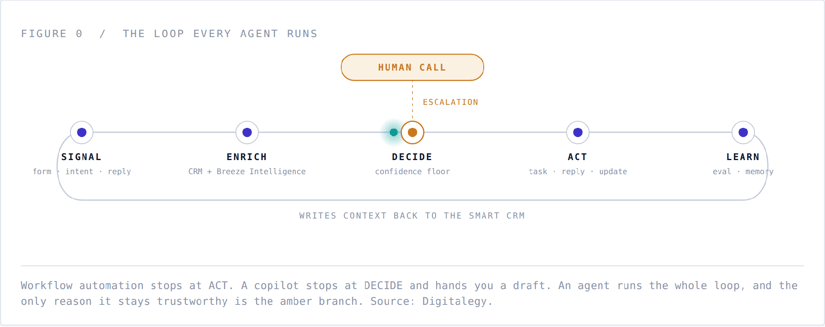
Workflow automation stops at ACT. A copilot stops at DECIDE and hands you a draft. An agent runs the whole loop, and the only reason it stays trustworthy is the amber branch. Source: Digitalegy.
CONTENTS
|
01 |
Your GTM stack just changed jobs |
|
02 |
What HubSpot Agent Hub actually is |
|
03 |
Four numbers worth arguing about |
|
04 |
The agentic GTM operating model |
|
05 |
Five agentic plays you can ship in 30 days |
|
06 |
What actually goes wrong |
|
07 |
A 90-day Agent Hub rollout |
|
08 |
Questions we get asked in every kickoff |
|
09 |
Where Digitalegy comes in |
01 SHIFT
Your GTM stack just changed jobs
For two decades, go-to-market software did one of two things. It remembered, or it reacted.
Systems of record remembered: the contact, the deal, the ticket. Systems of engagement reacted: the form was submitted, so the email went out. Everything in between, the reading and judging and deciding and writing and following up, was human work priced at human salaries.
Agent Hub is HubSpot’s move into a third category: systems of action. Software that receives an objective rather than an instruction, chooses its own next step, and reports on what it did.
That is not a positioning exercise. It changes what you can put on a roadmap this quarter, and it changes what breaks when you get it wrong.
Workflow, copilot, agent: three different animals
Most teams collapse these three into one budget line, then wonder why the AI initiative stalled at pilot. They are not the same thing and they do not fail the same way.
|
WORKFLOW AUTOMATION |
COPILOT |
AGENT |
|
|---|---|---|---|
|
Who starts the work |
An event you defined in advance |
A human, in the moment |
A trigger, a schedule, or another agent |
|
How it decides |
Rules you wrote |
The human decides, the model drafts |
It reasons toward the goal you set |
|
Handles ambiguity |
No. It no-ops or picks the wrong branch |
Yes, with a human in the loop |
Yes, inside the boundary you drew |
|
Typical failure |
Silent no-op |
Weak first draft, caught immediately |
Confidently wrong, at volume, unattended |
|
Unit of measure |
Executions |
Minutes saved per user |
Outcomes closed per period |
|
What it needs from you |
Logic |
A good prompt |
A job description and guardrails |
Read the last row twice. Workflows need logic. Copilots need prompting. Agents need management. If nobody on your team can write a job description, define what “done” looks like, and name an escalation path, Agent Hub will discover that for you in production.
Why agentic GTM is an operating model, not a slide
Agentic GTM means every recurring unit of revenue work has a named owner, and that owner is sometimes not a person.
Qualifying an inbound form fill is a unit of work. Researching an account before a discovery call is a unit of work. Closing a tier-one support ticket is a unit of work. Answering “has anyone at this company churned from us before” is a unit of work.
In the old model you bought tools that helped a human do those things faster. In the agentic model you assign each unit of work to the cheapest competent worker, then spend your human hours on the units that require taste, trust, or negotiation.
That is the whole thesis. Everything after this section is implementation.
02 PRODUCT
What HubSpot Agent Hub actually is
HubSpot introduced Agent Hub and Agent Builder as the place where AI agents get deployed, scoped and supervised, rather than as another feature bolted onto an existing hub (see HubSpot’s announcement and the Knowledge Base overview). The distinction is worth understanding, because it tells you where the leverage is.
Four layers, from the bottom up
Layer 1 · Smart CRM, the substrate
One object model. Contacts, companies, deals, tickets, custom objects, associations, and a unified activity timeline. This is the part competitors cannot easily copy. There is no sync tax and no shadow copy of your data for the agent to reason over. When an agent reads a ticket, the deal, the company, the lifecycle stage, the prior tickets and the custom object your ops team built last quarter are all one hop away.
Layer 2 · Breeze Intelligence, the enrichment layer
Firmographic and buyer-intent data, form shortening, and visitor de-anonymization. Agents make materially better decisions on complete records. An agent asked to route a lead from a record containing only a Gmail address is being set up to fail.
Layer 3 · Breeze, the reasoning layer
Copilot for human-initiated help, plus the runtime the agents themselves execute on. Details on the wider AI surface live on HubSpot’s AI product page.
Layer 4 · Agent Hub, the workforce layer
Where agents are configured, permissioned, monitored and measured, and where Agent Builder lets you compose agents that do not ship in the box.
|
VERIFY BEFORE YOU BUDGET HubSpot iterates quickly on tiers, seats and credit consumption for its AI surface. Treat any packaging figure you read in a blog post, including this one, as a starting point and confirm current pricing and limits in HubSpot’s own documentation before you commit a number to a business case. |
The stock agents, and the first job you should give each one
Every one of these can be deployed badly. The pattern that works: narrow the scope until the agent is boring, prove the metric, then widen.
Customer Agent
Resolves inbound support conversations across chat and email using your knowledge base, help docs and public site content. First job: your ten highest-volume repeat questions, chat only, with an explicit handoff rule. Where it fails: a thin or stale knowledge base, and questions that require an account-specific action it has no tool to perform.
Prospecting Agent
Researches accounts and contacts, then builds and executes multi-step outreach. First job: research and draft only, human sends, one ICP segment. Where it fails: unattended sending against a loose ICP definition. That is how a domain reputation dies.
Content Agent
Produces blog posts, landing pages, case studies and podcast assets from your brand voice and source material. First job: repurposing assets a human already approved. Where it fails: net-new thought leadership. It has no point of view of its own, and readers can tell.
Knowledge Base Agent
Reads real ticket volume, finds the gaps in your help content, and drafts the missing articles. First job: point it at last quarter’s ticket tags. Where it fails: when nobody owns the review queue and drafts quietly accumulate.
Data Agent
Answers questions about your CRM data and repairs structural mess: duplicates, formatting drift, missing required properties. First job: read-only questions for two weeks before you grant a single write permission. Where it fails: bulk write access on day one, against a property schema nobody has documented.
Agent Builder: the five things you configure
- Role and scope. One job, in one sentence. “Qualify inbound demo requests from Mexico and Colombia and route them to the right AE.” Not “help sales.”
- Knowledge and context. Which objects, properties, files and knowledge bases the agent may read. Least privilege applies to agents exactly as it does to employees.
- Tools and actions. What it can actually do: search, enrich, log a note, update a property, create a task, send a message, call an external system. Every write action is a risk decision, not a convenience.
- Triggers and hand-offs. What wakes it up, and who it wakes next. Agent-to-agent hand-offs are where the real leverage lives, and where debugging gets hard fast.
- Guardrails. Confidence thresholds, approval gates, volume caps, allow-lists, and a kill switch that a named person knows how to pull at 9pm on a Friday.
If you cannot fill in all five, you do not have an agent. You have an experiment, which is fine, as long as you label it as one and cap its blast radius accordingly.
MCP: why your agents should not live only inside HubSpot
HubSpot’s support for the Model Context Protocol matters more than the acronym suggests. MCP is the standard that lets an agent reach tools and data outside its home platform, and lets outside agents reach into the CRM with scoped permissions.
In practice: your Agent Hub agents can consult the warehouse, the billing system or the product database, and your engineering team’s agents can read CRM context without a bespoke integration per use case. Design for that on day one, or you will rebuild the same plumbing in two quarters. Our RevOps architecture practice treats the MCP layer as part of the CRM design, not an afterthought.
03 EVIDENCE
Four numbers worth arguing about
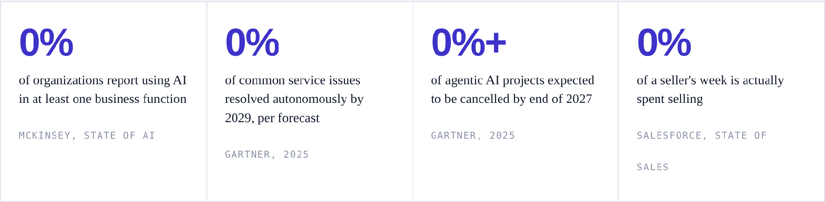
Read them together, not separately
The first says the experiment phase is over. The second says the ceiling is high. The third says most teams will not reach it. The fourth explains why it is worth the attempt anyway.
Gartner attributes the cancellation forecast to three causes: escalating costs, unclear business value, and inadequate risk controls. Notice what is absent from that list. Nobody says “the models were not good enough.”
The dominant failure mode in agentic GTM is managerial, not technical. That is good news, because managerial problems have known solutions.
FIGURE 1 / DEPLOYMENT SEQUENCING
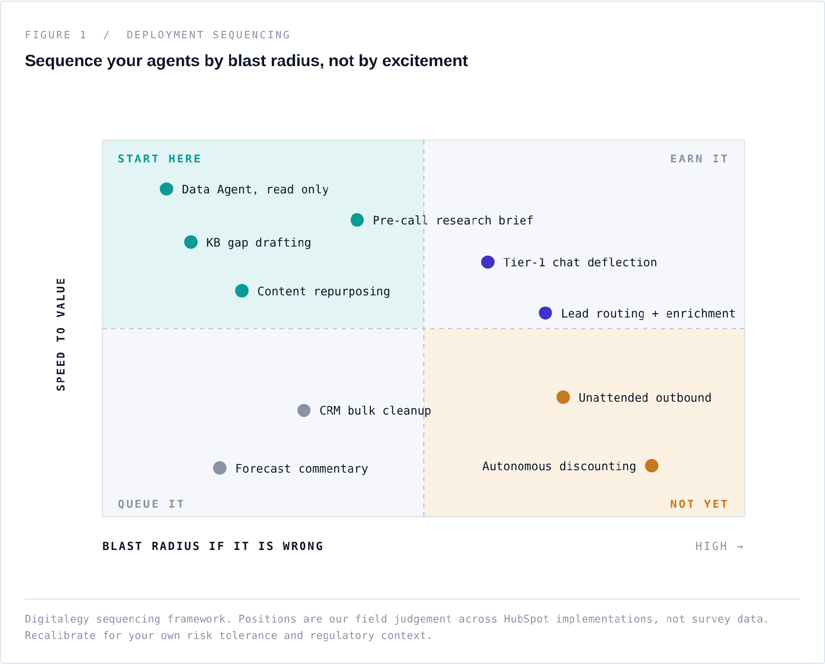
Digitalegy sequencing framework. Positions are our field judgement across HubSpot implementations, not survey data. Recalibrate for your own risk tolerance and regulatory context.
The work does not disappear. It changes shape.
The most common mistake in an agentic business case is modelling agents as pure subtraction: hours out, savings in. That is not what happens. A supervision workload appears where none existed, and if you do not staff it, quality erodes quietly until a customer tells you.
FIGURE 2 / ILLUSTRATIVE MODEL
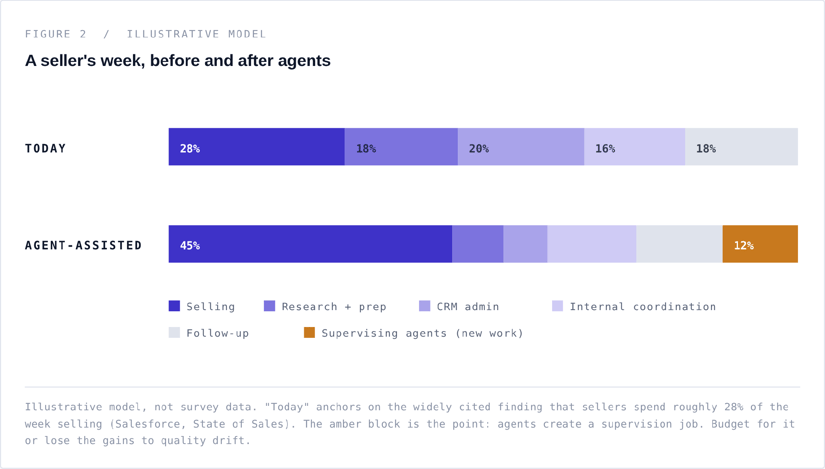
Illustrative model, not survey data. “Today” anchors on the widely cited finding that sellers spend roughly 28% of the week selling (Salesforce, State of Sales). The amber block is the point: agents create a supervision job. Budget for it or lose the gains to quality drift.
04 MODEL
The agentic GTM operating model
Five layers. Skip one and the whole structure tilts.
Layer 1: Data. Before anything else.
An agent reasoning over dirty data does not fail loudly. It fails plausibly, which is considerably worse, because plausible failures ship to customers. Clear this list before you turn on a single write action.
- Duplicate rate measured and under active control, with a dedupe owner
- Lifecycle stages that each mean exactly one thing, documented in plain language
- Required properties enforced at the point of entry, not cleaned up later
- Association integrity between contacts, companies, deals and tickets
- Knowledge base reviewed within the last 90 days, with owners per article
- A property dictionary a new hire could read and understand
- Retention and deletion rules that satisfy your legal team, not just your ops team
This is unglamorous and it is where most of the value is decided. We publish our full pre-flight audit in the HubSpot implementation practice.
Layer 2: Work. Map the work, not the tools.
Inventory the recurring units of revenue work. For each one, capture five fields: volume per month, minutes per unit, current owner, ambiguity level, and cost of being wrong. Then rank by (volume × minutes) ÷ cost of being wrong.
Your first three agents are at the top of that list. Not the ones in the launch keynote.
Layer 3: Judgement. Write the job description.
If you would not hire someone without a job description, do not deploy an agent without one. Seven fields, one page, reviewed by the person who owns the number it affects.
- Objective. One sentence, in business language.
- Scope. Explicitly in, and explicitly out. The “out” list is the important half.
- Inputs. Which records, properties and documents it may read.
- Tools. Every action it can take, with write actions listed separately.
- Definition of done. What a successful run looks like, stated so a human could grade it.
- Escalation triggers. The specific conditions that end the agent’s turn.
- Metrics. One output metric and one restraint metric. Both, always.
Layer 4: Escalation. The human is a feature, not a fallback.
Escalation design is the single highest-leverage thing you will do, and it is usually an afterthought. Six patterns that earn their keep:
- Confidence floor. Below a threshold, stop and hand off. Tune it with real data, not intuition.
- Novelty detector. If the request does not resemble anything in the eval set, escalate by default.
- Sentiment trigger. Frustration in the thread ends the agent’s turn immediately.
- Value threshold. Above a deal or account size, a human touches it. Always.
- Regulatory trigger. Anything touching billing disputes, data deletion, health or legal claims routes to a person.
- Three strikes. Three unresolved turns on the same thread is a hand-off, not a fourth attempt.
Then give every escalation an SLA and a watcher. An escalation that lands in a queue nobody monitors is a dropped customer with extra steps.
Layer 5: Measurement. Two metrics per agent. Minimum.
One metric for output, one for restraint. Deflection rate and CSAT. Meetings booked and unsubscribe rate. Records enriched and records incorrectly overwritten. Measure only the output metric and you will efficiently optimise for a number that damages the business.
FIGURE 3 / MATURITY MODEL
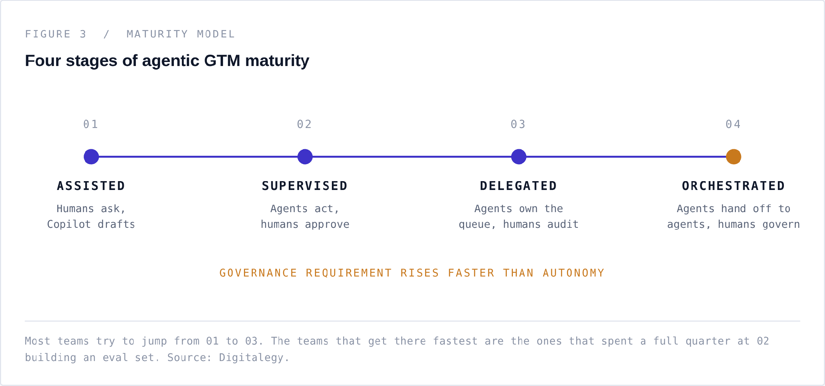
Most teams try to jump from 01 to 03. The teams that get there fastest are the ones that spent a full quarter at 02 building an eval set. Source: Digitalegy.
05 PLAYS
Five agentic plays you can ship in 30 days
Each of these is deliberately small. Small is what ships, and shipped is what teaches you the second thing to build.
PLAY 01
Speed-to-lead triage
Inbound demo requests get enriched, scored against ICP, routed to the right owner and answered within minutes, at any hour, in any time zone. This is the play with the clearest arithmetic: contact rates collapse as response time grows, and no human team covers a 24-hour clock.
|
TRIGGER |
Form submission on a demo or pricing page |
|
TOOLS |
Breeze Intelligence enrichment, CRM read, property write, task create, owner assignment |
|
DONE |
Record enriched, ICP fit scored, owner assigned, first-touch reply sent, task created |
|
ESCALATION |
Named target account, existing open deal, or ICP fit below threshold |
|
METRICS |
Median first-response time / misroute rate |
PLAY 02
The pre-call brief
Ninety minutes before every discovery call, the owner receives a one-page brief on the timeline: company context, funding and headcount signals, prior touches, open tickets, competitors mentioned, and three questions worth asking. Reps stop doing twenty minutes of tab archaeology per call.
|
TRIGGER |
Meeting on a connected calendar, 90 minutes out |
|
TOOLS |
CRM read across associations, enrichment, web research, note create |
|
DONE |
Brief logged as a note on the contact and sent to the owner |
|
ESCALATION |
None needed. Read-and-write-a-note only, which is why this is a good second play |
|
METRICS |
Brief open rate / rep-reported accuracy score |
PLAY 03
Tier-one deflection, chat only
Customer Agent handles your ten highest-volume repeat questions in live chat, with a hard handoff on everything else. Ten questions, not a hundred. You are buying a clean measurement, not maximum coverage.
|
TRIGGER |
New chat conversation in the inbox |
|
TOOLS |
Knowledge base search, help doc search, ticket create, handoff to queue |
|
DONE |
Question answered and confirmed resolved by the customer, or handed off |
|
ESCALATION |
Frustration detected, billing or data-deletion topic, three unresolved turns, enterprise account |
|
METRICS |
Deflection rate / CSAT on agent-handled conversations |
PLAY 04
Knowledge gap closer
The agent reads last quarter’s ticket volume, clusters the questions your help centre answers badly, and drafts the missing articles into a review queue. This play compounds: every article it writes makes Play 03 measurably better.
|
TRIGGER |
Weekly schedule |
|
TOOLS |
Ticket read, knowledge base read and draft, task create |
|
DONE |
Ranked gap list plus drafted articles sitting in a named human’s review queue |
|
ESCALATION |
Any gap touching pricing, security or contractual language goes to a specialist |
|
METRICS |
Articles published per month / deflection lift on covered topics |
PLAY 05
Pipeline hygiene, read-only first
The agent audits open pipeline nightly and reports what is wrong: stale close dates, missing next steps, deals in a stage their activity does not support, contacts with no association. It reports for two weeks. Only then does it get permission to fix anything.
|
TRIGGER |
Nightly schedule |
|
TOOLS |
Week one to two: CRM read only. Week three onward: task create, then scoped property write |
|
DONE |
Exception report delivered to each manager before the morning stand-up |
|
ESCALATION |
Any correction on a deal above your value threshold requires manager approval |
|
METRICS |
Percentage of pipeline passing hygiene checks / incorrect-edit count |
Notice the pattern across all five: read before write, draft before send, narrow before wide, and a restraint metric on every single one.
06 FAILURE
What actually goes wrong
Eight failure modes we see repeatedly. None of them are model failures.
The eight ways an Agent Hub rollout goes sideways
01 · Instruction creep
An agent’s instructions start at one job and, over six weeks of small additions, become a strategy document. Performance degrades and nobody can say which addition caused it. Version your instructions. Change one thing at a time.
02 · No eval set
Teams ship agents with no fixed set of test cases and graded expected outputs, so they have no way to tell whether last week’s change helped. Build fifty labelled cases before launch. Fifty is enough to be useful and small enough to actually get done.
03 · No named owner
“The AI team owns it” means nobody owns it. Every agent needs one person whose performance review is affected by its restraint metric.
04 · Cost blindness
Agentic consumption scales with volume, and volume is exactly what you are trying to increase. Model unit cost per resolved outcome before launch, and set an alert on consumption, not just on the monthly bill.
05 · Tone drift
The agent is accurate and sounds nothing like you. In a second language this is much worse, because generic machine Spanish reads as a translated brand, and a translated brand loses trust in the region it is selling to. Give the agent real approved examples, not adjectives.
06 · Silent failure
The agent stops firing on a Thursday and you find out on the following Tuesday from a pipeline report. Monitor run volume as a health metric, and alert on unexpected silence, not only on errors.
07 · The compliance conversation you skipped
Automated decisioning on personal data brings obligations that vary by market, and LATAM is not one regulatory environment. Brazil’s LGPD, Mexico’s federal data protection framework and Colombia’s regime differ in consequential ways. Bring legal in during design, not after the first complaint.
08 · Agent sprawl
Eighteen months in, you have thirty-one agents, eleven of which nobody remembers commissioning, four of which contradict each other. Keep a registry from agent number one: purpose, owner, permissions, last review date. Retire aggressively.
07 ROLLOUT
A 90-day Agent Hub rollout
This is the plan we run with clients. It is deliberately slow in the first month, and that is why it finishes faster.
FIGURE 4 / ROLLOUT PLAN
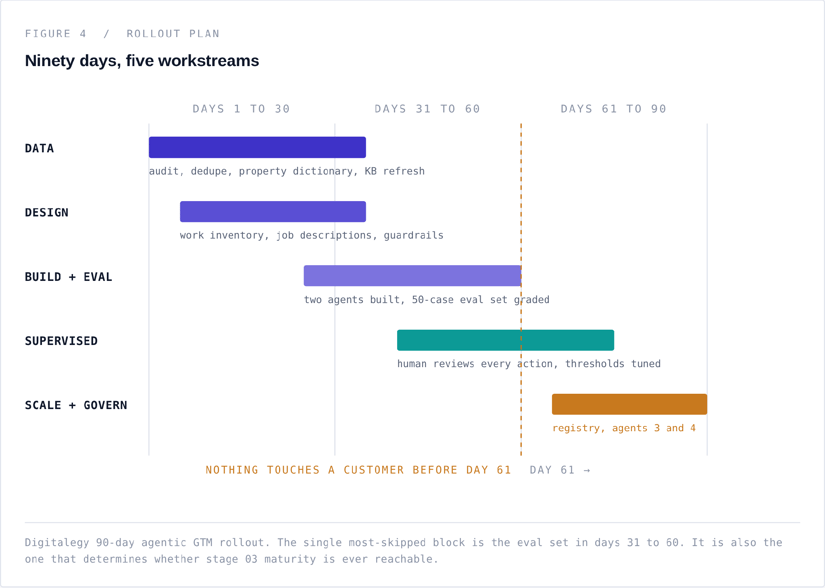
Digitalegy 90-day agentic GTM rollout. The single most-skipped block is the eval set in days 31 to 60. It is also the one that determines whether stage 03 maturity is ever reachable.
Days 1 to 30: earn the right to deploy
Data audit and remediation, property dictionary, knowledge base refresh, work inventory, and the first two job descriptions written and signed off by the person who owns the affected number. No agent goes live this month. This is the month people want to skip and the month that decides the outcome.
Days 31 to 60: build in the light
Build two agents, not five. Assemble a fifty-case eval set with graded expected outputs. Run the agents against it, in an internal sandbox, and tune the confidence thresholds against real results rather than a hunch. Write the escalation SLAs and name the watchers.
Days 61 to 90: supervised, then scaled
Go live with a human reviewing every customer-facing action, then relax review as the eval scores hold. Stand up the agent registry. Commission agents three and four using the pattern that worked. Take one report to the leadership team that shows the output metric and the restraint metric side by side, because that pairing is what earns you the budget for the next quarter.
08 FAQ
Questions we get asked in every kickoff
Is Agent Hub just Breeze with new packaging?
No, and the difference is operational. Breeze is the AI capability layer, including Copilot and Breeze Intelligence. Agent Hub is where agents are deployed, scoped, permissioned and measured, and Agent Builder is where you compose the ones HubSpot does not ship. The shift is from “AI features inside tools” to “a workforce you manage.” Confirm current scope in the HubSpot Knowledge Base, which is updated more often than any blog post.
Do we need Operations Hub or a data warehouse first?
You need clean, well-associated data. Whether that requires additional tooling depends on how much of your revenue-relevant truth already lives in HubSpot. If pricing, entitlements or usage data sits elsewhere and your agents need it to make decisions, you need a real integration strategy, and MCP is the right place to start that conversation.
Will agents replace our SDR team?
They will replace a large share of the research, list building, data entry and first-touch drafting inside the SDR role. They will not replace the judgement about which accounts deserve a human, the multi-threading, or the conversation where a prospect says something unexpected. The teams doing this well are not shrinking headcount, they are raising the floor on what each rep is expected to cover.
How do we stop an agent from emailing something embarrassing?
Approval gates on outbound for the first sixty days, allow-lists rather than block-lists, volume caps per day, and a kill switch with a named owner. Then keep the approval gate on any segment where the cost of one bad message exceeds the cost of one week of review.
What does this cost to run?
Model it as cost per resolved outcome, not as a licence line. Take total consumption plus supervision hours, divide by outcomes closed, and compare against the fully loaded human cost of the same outcome. That is the only number a CFO will engage with, and it is the only one that stays honest as volume grows. Verify current consumption mechanics with HubSpot before you build the model.
Does this work in Spanish and Portuguese?
Yes, with one caveat that matters commercially. Multilingual output is table stakes; regional voice is not. An agent trained on translated content sounds translated, and in Mexico, Colombia and Brazil that costs you credibility with exactly the buyers you are trying to win. Feed it approved regional copy, and test with native reviewers in each market before you scale.
09 NEXT
Where Digitalegy comes in
We are a HubSpot partner that builds agentic GTM systems for revenue teams in North America and Latin America. Not pilots. Operating models: the data layer, the job descriptions, the eval sets, the escalation design and the governance that keeps it all trustworthy at volume.
If you are staring at Agent Hub wondering where to start, start with the work inventory. If you would rather not do that alone, that is what we are for.
|
Book an agentic GTM readiness session Sixty minutes. We map your recurring revenue work, score your data readiness, and leave you with a ranked list of the first three agents worth building, whether or not you work with us. |
KEEP READING
SOURCES
HubSpot, Meet Agent Hub and Agent Builder
HubSpot Knowledge Base, Understand Agent Hub
Don't forget to share this post!
